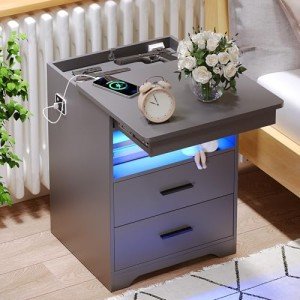
Maintenance & Troubleshooting
Maintaining a tech-integrated nightstand requires consistent airflow monitoring to prevent the "heat-trap" effect common in wooden enclosures. Periodically cleaning intake vents and using surge protectors are the most effective ways to prevent the logic board failures that render smart features useless.
Common Failure Modes
Electronic furniture faces unique mechanical and electrical challenges that can impede its "smart" capabilities over time.
- Restricted ventilation causes thermal overload stress; ensure the unit has at least two inches of rear clearance to protect the internal motherboard.
- Unstable power grids trigger voltage sensitivity; always connect the unit to a high-quality surge protector to prevent clock and speaker resets.
- Frequent switching of motorized parts leads to relay fatigue; avoid "testing" the automated locks repeatedly to preserve the life of the electronic actuators.
- Consistent heavy loading on the top panel results in creep deformation; place heavy lamps near the corners to avoid bowing the wood and misaligning touch sensors.
- Subtle vibrations can cause a solder joint crack; keep the unit on a level, vibration-dampening surface to protect internal connections.
- Blocked cooling fans lead to airflow restriction stress; vacuum the rear intake grilles monthly to prevent the compressor from burning out.
- Dry winter air increases static discharge damage; touch a grounded object before using the interface to avoid sending a spark through the sensitive circuits.
Environmental Stress Factors
The placement and surroundings of your smart furniture significantly impact its long-term reliability and finish.
- A high dust load acts as an insulator on circuit boards; use compressed air to blow out the internal ports twice a year to maintain cooling efficiency.
- Moist environments promote high humidity acceleration; avoid placing tech-heavy furniture directly next to humidifiers to prevent trace corrosion.
- Direct sunlight results in high UV exposure; use window films or position the unit away from solar paths to prevent touchscreen delamination.
- Household pet hair clogging quickly chokes active cooling systems; inspect and clear the intake filters weekly if you have long-haired animals.
Key Components
Understanding the anatomy of your smart-nightstand helps in identifying which parts require the most care.
- The electronic control boards manage all logic functions; keep them dry and cool to avoid the most common cause of complete system failure.
- A robust structural housing shields the electronics; look for units with dedicated internal bays that isolate the wiring from the storage areas.
- An effective airflow ventilation path is critical; ensure no bedding or curtains obstruct the passive or active cooling vents.
- The power supply is the heart of the tech; check for UL-listed transformers that offer stable DC conversion for your mobile devices.
- In refrigerated models, the refrigeration loop manages climate; keep the condenser coils clean to ensure silent, energy-efficient operation.
- The sliding rail system handles physical access; look for soft-close, ball-bearing glides that reduce mechanical vibration near the electronics.
Related Categories
If you are researching furniture for a full-room setup, you may also want to review the failure expectations for these related devices: